
Create or Import Your Policies
Start with an existing document, combine multiple documents into a draft, or use AI assistance to organize your content. Review and edit before publishing. You stay in control of what each policy says.
For HR and people teams
Create, distribute, and manage workplace policies without the spreadsheets, scattered documents, and endless follow-up emails.
Turn your HR policies into employee training, acknowledgments, and trackable requirements—then automatically manage reminders, updates, and renewals.
14 days free. No credit card required.
Creating a workplace policy is only the beginning. The right employees still need to receive it, complete their training, and acknowledge it. When the policy changes, the process starts again.
Compliance Flux brings the entire process together. From the first draft to the latest acknowledgment, your policies, employees, requirements, and completion records stay connected in one system.
Inside Compliance Flux
Move from company-wide completion to your policy library and quiz editor. These are the administrator tools behind the workflow.
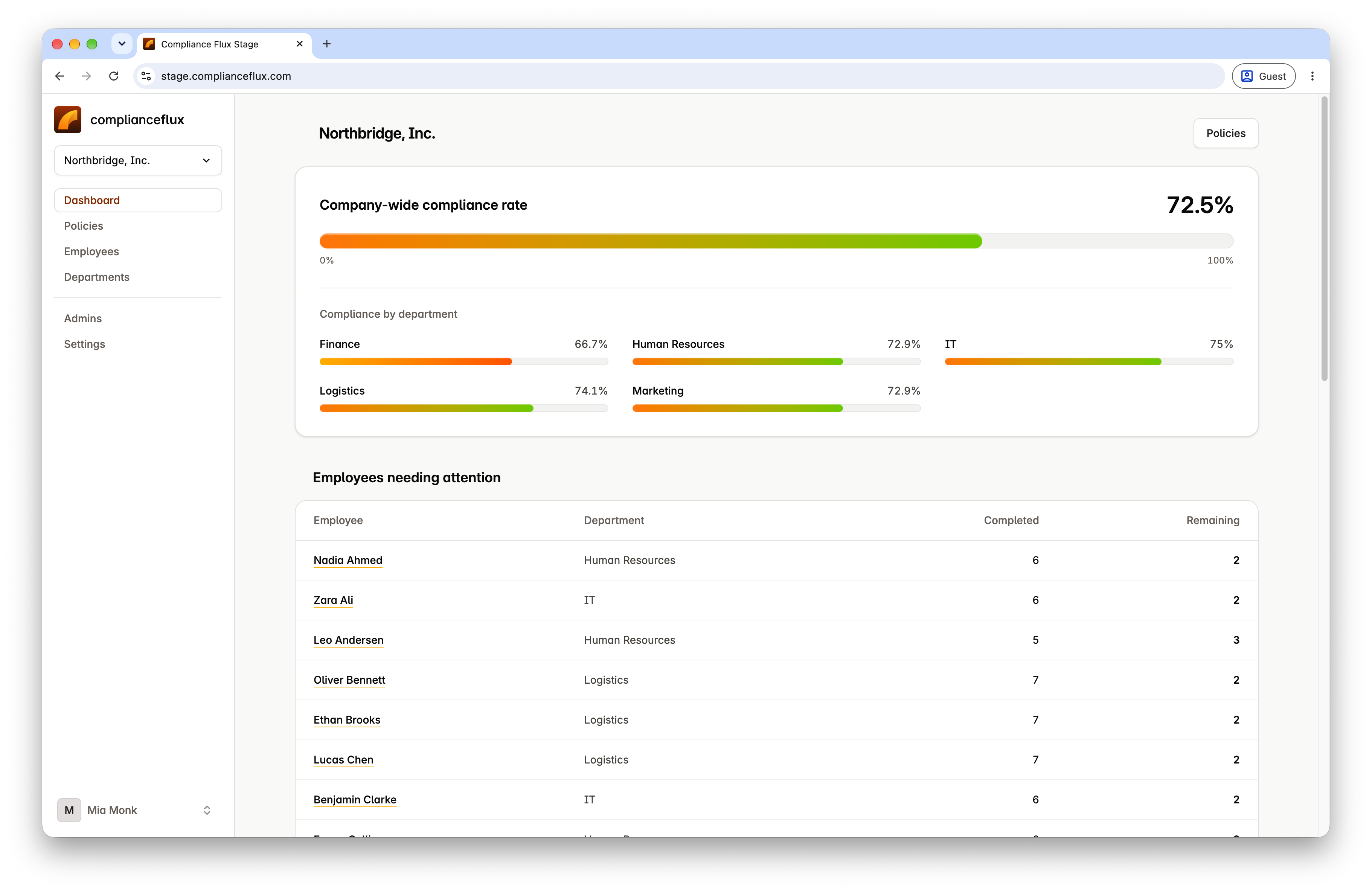
Administrator view · Product screenshot
See completion across your organization and departments, then identify employees who need follow-up.
Captured in the staging workspace. Select the image to view full size.
From draft to completion
Start with an existing document, combine multiple documents into a draft, or use AI assistance to organize your content. Review and edit before publishing. You stay in control of what each policy says.
Generate step-by-step written guides, slide presentations, AI-narrated audio, and editable quizzes from your policy. Give employees more than a document to read.
Publish for the entire company or selected departments. Department-based assignments include employees who join those teams later, without another manual rollout.
Require an acknowledgment, a passing quiz, or both. Track employee progress and send reminders based on what each person still needs to complete.
Publish updated versions, choose effective dates, and decide whether employees need to acknowledge a change or retake the quiz. Previous versions, signatures, and results remain on record.
Less administration.
More follow-through.
Bring your employee policy management into one repeatable workflow.
Policy acknowledgments
Sending a policy doesn’t tell you whether employees have completed their requirements. Give each employee clear steps and track completion against the rules you set.
Require an acknowledgment, a quiz, or both. Employees can sign from desktop or mobile, and the acknowledgment record stays connected to the relevant policy version.
No more reconciling email replies and spreadsheets to determine who’s finished.
The employee experience
Employees see their assignments, read the policy, complete required quizzes, and ask policy questions from their own workspace.
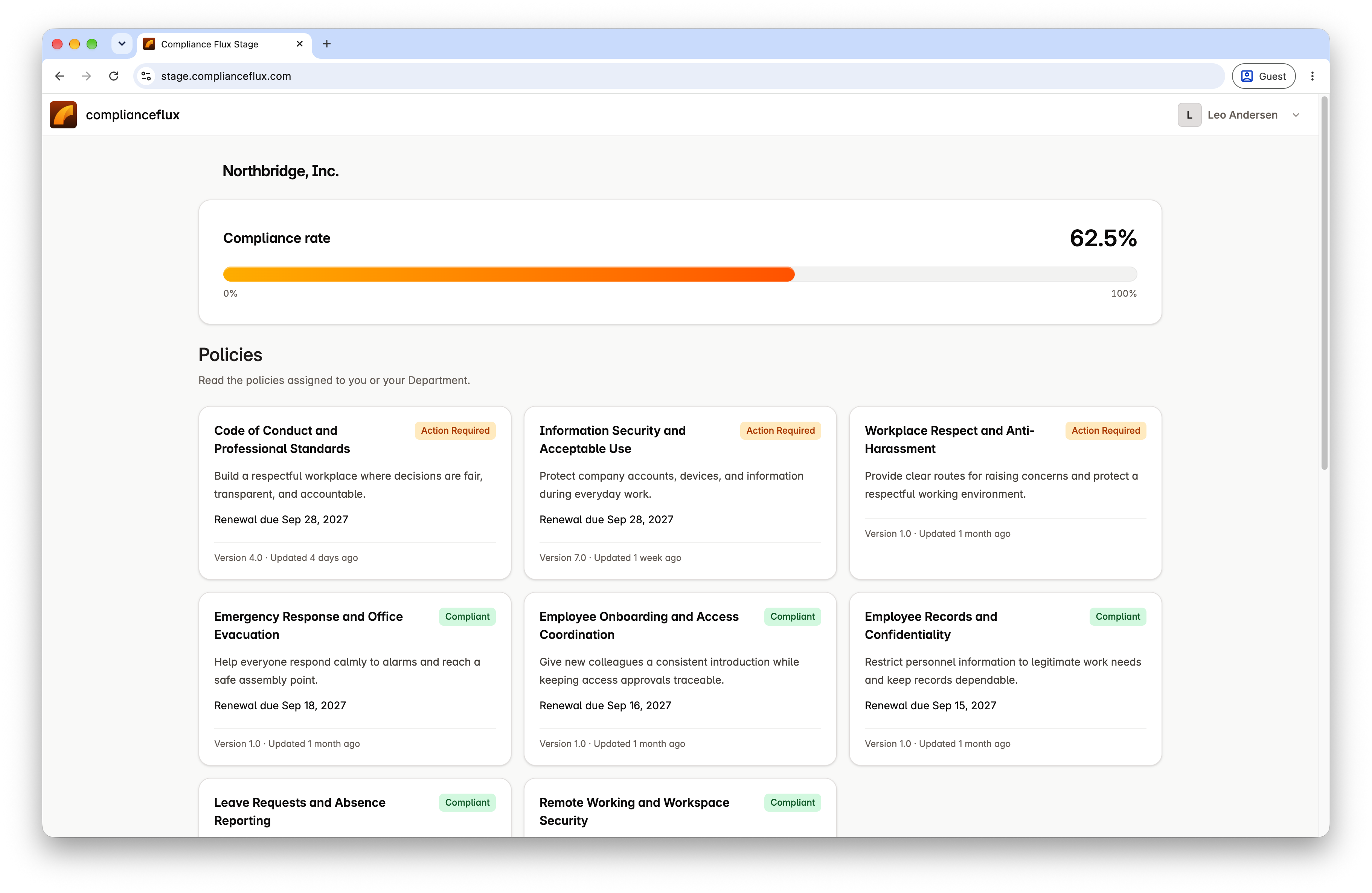
Employee view · Product screenshot
Employees see their assigned policies and the requirements that still need attention.
Captured in the staging workspace. Select the image to view full size.
AI-powered training
A document alone isn’t always the easiest way to communicate workplace expectations. Generate supporting materials from your policy content, with editable quizzes and written guidance you can refine.
Step-by-step guidance employees can read at their own pace.
A visual way to work through the policy’s key points.
AI-generated narration, with a transcript to follow along.
Policy-based questions, with passing scores and attempt limits you control.
One policy. Multiple ways to learn. One connected completion record.
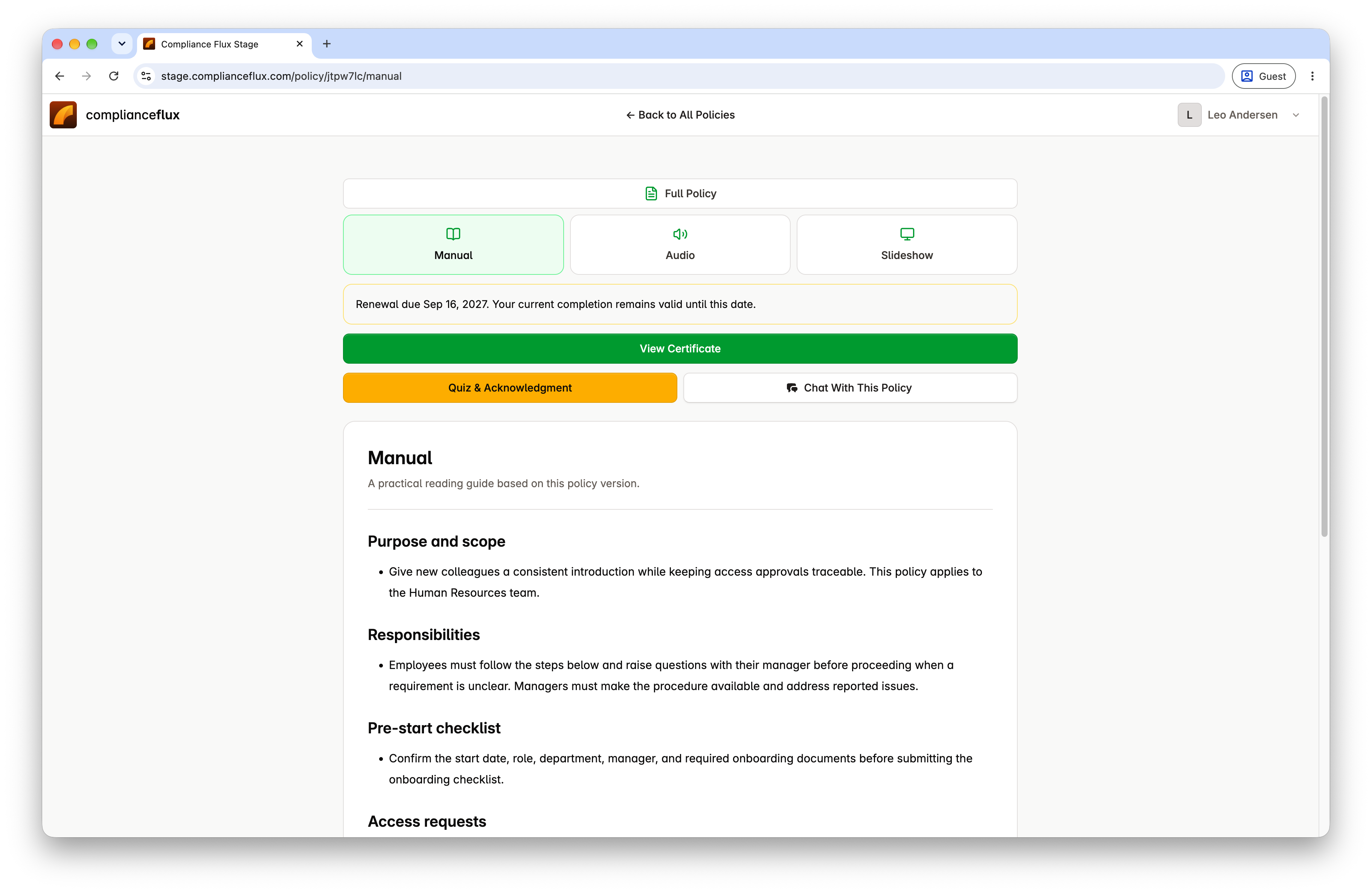
Employee view · Product screenshot
Read a practical guide based on the policy version.
Captured in the staging workspace. Select the image to view full size.
Automatic follow-through
HR teams shouldn’t have to manually track every incomplete acknowledgment or upcoming renewal. You decide the requirements. Compliance Flux handles the routine follow-through.
Assign policies by department or company-wide audience, including employees who join later.
Employees receive follow-ups for the requirements they haven’t completed.
Set a renewal schedule per policy and let the next completion cycle begin automatically.
Choose a new acknowledgment, a quiz retake, or no additional action when a policy changes.
Visibility and records
See policy completion across the organization and by department. Know which requirements are complete and where follow-up is needed, without maintaining separate tracking sheets.
Download policy acknowledgments, quiz certificates, or combined completion documents. Records remain connected to the relevant policy version, showing what employees were assigned and what they completed.
Completion tracking reflects your configured policy requirements, not a guarantee of legal compliance.
Your people, organized
Compliance Flux focuses on employee policy requirements—not payroll, benefits, or general HR administration.
Import employees from CSV, organize departments, and manage policy assignments in one place. Archive employees without erasing their historical completion records.
Explore all policy-management features →Reduce manual policy administration, follow-ups, and acknowledgment tracking.
Get visibility into employee policy completion across teams and departments.
Make assignments and training part of a repeatable employee workflow.
Keep policy versions, acknowledgments, results, and completion evidence organized.
Simple pricing
Start with the policy-management, training, and tracking tools your team needs. Includes AI-generated training materials, employee acknowledgments, quizzes, automatic assignments, reminders, policy updates, and completion tracking.
Estimate pricing for your team →Up to 100 employees
$149/month
Each additional employee
+$1/month
No credit card required.
HR policy management software helps organizations create, organize, distribute, update, and track workplace policies. It gives HR teams a centralized way to manage employee requirements, acknowledgments, and policy-related records instead of relying on documents, emails, and spreadsheets.
Yes. Import existing documents or combine several into a draft. Preserve your original wording or use AI assistance to organize and consolidate the content before reviewing and publishing it.
Yes. Employees can acknowledge assigned policies using a mouse, finger, stylus, or typed-name option. Compliance Flux records the acknowledgment wording, signature, and date alongside the relevant policy version.
Yes. You can require an acknowledgment, a passing quiz, or both. Completion is based on the requirements you configure for each policy.
Publish a new version, set an effective date, and decide what employees must complete. You may require a new acknowledgment, a quiz retake, or no additional action. Earlier versions and completion records remain available.
Yes. Assign policies to selected departments or the entire organization. Department-based assignments also include employees who join those departments later.
No. Compliance Flux manages employee policy requirements, training, acknowledgments, and completion records. Keep your existing HR system for payroll, benefits, and general employee management. You can import employees into Compliance Flux from CSV.
No. Your HR and legal teams remain responsible for reviewing policy content and determining applicable requirements. Compliance Flux helps you distribute approved policies, manage employee completion, and maintain records of the process.
Less chasing. More progress.
From employee training and acknowledgments to reminders, completion tracking, and renewals, bring your entire HR policy workflow into one place.
Spend less time chasing paperwork and more time supporting your people.
14 days free. No credit card required.