
Organization-wide conduct
Assign a code of conduct across the company. Choose an acknowledgment, a passing quiz, or both, and review which assigned employees still have work to complete.
Across departments. Through every policy cycle.
A company-wide code of conduct. A security policy for IT. An operating procedure for logistics. Different audiences need different requirements—and one clear way to track them.
Compliance Flux connects policy publication, department assignments, employee completion, and recurring renewals. See where each rollout stands without collecting status updates from every team.
14-day free trial. No credit card required.
Start with the audience, not a company-wide email. Compliance managers and operations leaders can apply a shared process while keeping each policy relevant to the departments receiving it.
Use these rollout examples to decide who should receive a policy and what they must complete. Your organization sets the requirements; these are not prescribed compliance standards.
Assign a code of conduct across the company. Choose an acknowledgment, a passing quiz, or both, and review which assigned employees still have work to complete.
Direct a security procedure to the departments that need it. Department-based assignments also cover employees who join those teams later.
Distribute a revised procedure to the relevant department. Decide whether the change requires another acknowledgment or quiz, rather than treating every update as a new rollout.
The policy library keeps department context and published version information visible as you manage these rollouts.
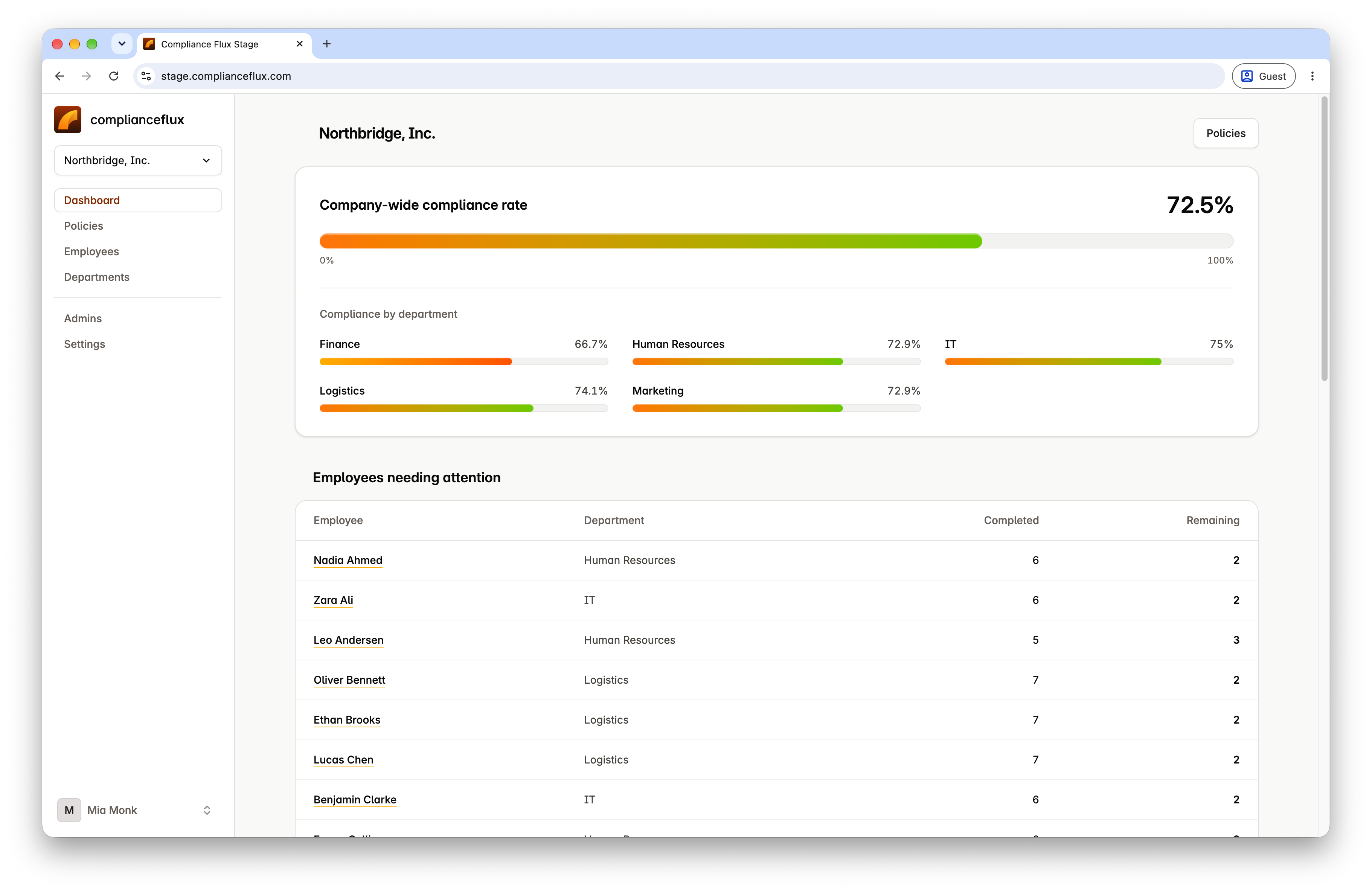
Administrator view · Product screenshot
See completion across your organization and departments, then identify employees who need follow-up.
Captured in the staging workspace. Select the image to view full size.
A rollout needs decisions at each stage. Compliance policy management software should connect those decisions to the employee requirements and records that follow.
Import or prepare the policy, review its content, and select an effective date. Keep the published version as the reference for the rollout.
Choose the entire company or selected departments. Check the audience before publication so the right people receive the requirement.
Require an acknowledgment, a passing quiz, or both. Supporting training materials help employees work through the policy; completion follows the rules you configure.
Use company and department progress to find gaps, then review employees with unfinished requirements. Automatic reminders handle routine follow-up.
Publish a revision and choose a new acknowledgment, a quiz retake, or no additional action. A changed document does not have to mean the same next step for every rollout.
Configure recurring completion per policy. The next cycle can begin without replacing the published policy or discarding earlier completion records.
An organization-wide percentage is a starting point, not the whole answer. Policy compliance tracking software helps you move from the overall picture to the requirements still awaiting action.
Review progress by department, identify employees needing attention, and check their assigned requirements. An unfinished quiz and an outstanding acknowledgment call for different next steps.
Employees see their own assigned policies and required actions. Routine reminders follow up on incomplete requirements; your team can concentrate on questions or exceptions that need a person.
The administrator's rollout becomes an employee's assigned policy. Employees can open the published content, use its supporting materials, and complete the actions required for that policy.
Keep training and sign-off requirements attached to the same policy instead of sending employees between disconnected records.
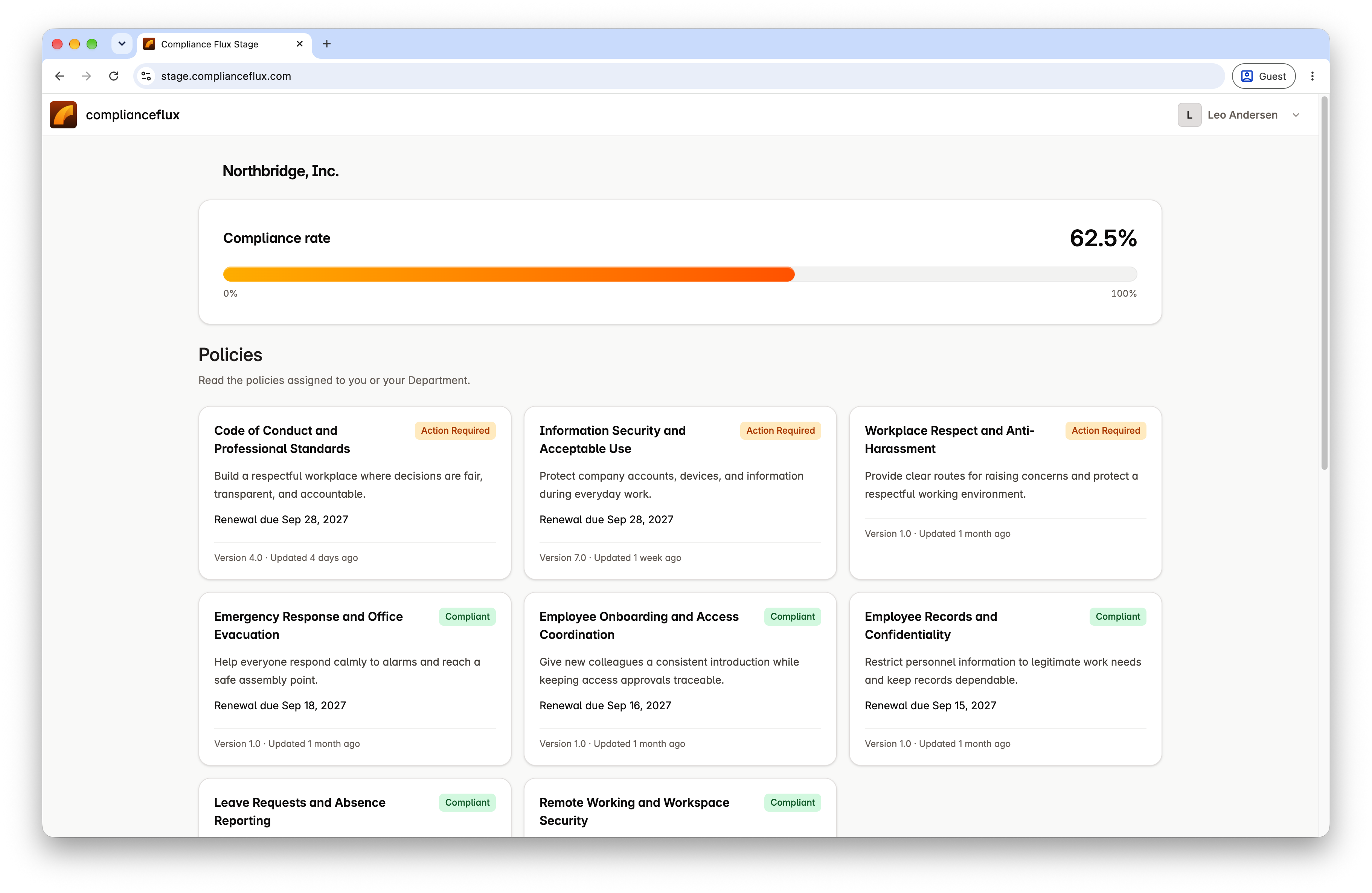
Employee view · Product screenshot
Employees see their assigned policies and the requirements that still need attention.
Captured in the staging workspace. Select the image to view full size.
Collect an electronic acknowledgment and retain the signature, date, and associated policy version.
See policy attestation and acknowledgment tracking →Provide written guides, slides, narrated audio, and editable quizzes. Configure a passing quiz when a knowledge check is part of your process.
Explore employee training and HR compliance workflows →A policy title may stay the same through several revisions. For a meaningful review, you need to know which version an employee completed and when that action was recorded.
Compliance Flux links completion records to policy versions. Earlier versions and records remain available when you publish a change or open another completion cycle.
Access signatures, acknowledgment dates, quiz results, and downloadable completion documents alongside the policy they relate to. Use them to support an internal review, customer assessment, or audit request.
Compliance Flux tracks assigned policy activities and their completion. It does not independently observe employees at work, verify ongoing behavioral adherence, or guarantee compliance with a law, regulation, or standard.
It is not a replacement for a comprehensive GRC platform. Use it for the employee-facing policy lifecycle while keeping legal interpretation, risk decisions, and broader assurance processes with the responsible teams.
Compliance managers can coordinate the records, operations leaders can monitor department rollouts, and HR can manage employee requirements within the same policy workflow. Your organization remains responsible for deciding whether the evidence meets a particular review or audit requirement.
Manage department assignments, employee requirements, update cycles, reminders, and completion records in one place.
Up to 100 employees
$149/month
Each additional employee
+$1/month
No credit card required.
Compliance Flux tracks the completion of assigned policy requirements: acknowledgments, passing quizzes, or both. It connects those actions to policies and records so administrators can review outstanding work across departments. It does not measure ongoing adherence to a policy in daily work.
Yes. Choose a company-wide audience or selected departments for each policy. This lets a shared conduct policy reach the organization while a department-specific procedure reaches its intended team.
Department-based policy assignments include employees who join the relevant department. Administrators can review the employee's assigned requirements and completion status without creating a separate policy rollout for each new joiner.
No. When publishing an update, choose whether employees need a new acknowledgment, a quiz retake, or no additional action. Set the effective date and review the requirements for that revision.
Yes. Recurring requirements can open another completion cycle without replacing the published version. Prior completion records remain available, keeping periodic renewals distinct from policy revisions.
Neither describes its full scope. Compliance Flux goes beyond document storage by connecting policies to employee actions, reminders, and completion records. It does not replace a comprehensive GRC platform or determine whether your organization satisfies regulatory obligations.
Choose the audience. Set the required actions. See what remains outstanding—and retain the record when the cycle is complete.
14 days free. No credit card required.